
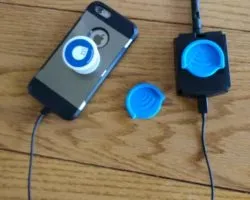
Trying out a Pop Socket Holder with the Wi-Spy Air
No sections available
No sections available
Interestingly enough, one of the most frequent questions I get about the Wi-Spy Air is, “Will there be a way to attach it to a phone?” The quick answer is yes. We will include a couple of options: velcro and a clip (same clip that is included with the DBx).
This usually leads to getting recommendations on other ideas to try out. Often, they are pretty extravagant ideas. But, creative none-the-less.
A MetaGeek team member also had an idea – one of the simplest I’ve heard and the easiest to test. A couple years back, MetaGeek jumped on the pop socket craze and we purchased some branded pop sockets to give away as swag. I didn’t really like the idea of pop sockets, but tried it out anyways and actually came to enjoy it. I don’t really use it as a handle sort of utility that they are designed for, but more so because I liked fidgeting with it.
Fast forward a couple years and my team member was telling me how it might be cool to get a pop socket holder, like the one he uses in his car, and see how it well it might work joining the Wi-Spy Air to my phone. Intriguing idea…
Well, I quickly found these guys on Amazon (they even have a Wi-Fi symbol!) and two days later I was able to test them out!


The setup actually works quite well; you just need to make sure the pop socket is under the crease of the holder. The only downside was when I tried using a large directional antenna, which is heavier and larger than the Wi-Spy Air and adds more strain than I am comfortable on the connection. Other than that, I think I found my preferred way to attach the Wi-Spy Air to my iPhone!

Enter your email to subscribe to our newsletter and receive updates.

At Oscium, we've spent over 16 years turning complex technology into tools that
work better for everyone.


©2026 OSCIUM. All Rights Reserved.